AI Game Maker
Describe the game you want, and AI builds a complete starter setup — components, deck cards, rules, and a rulebook PDF — saved straight into My Games.
When to use it
The AI Game Maker is great when you want a starting point instead of a blank page. It generates a full draft you can open in the simulator right away, then reshape into your own game.
Generate a game
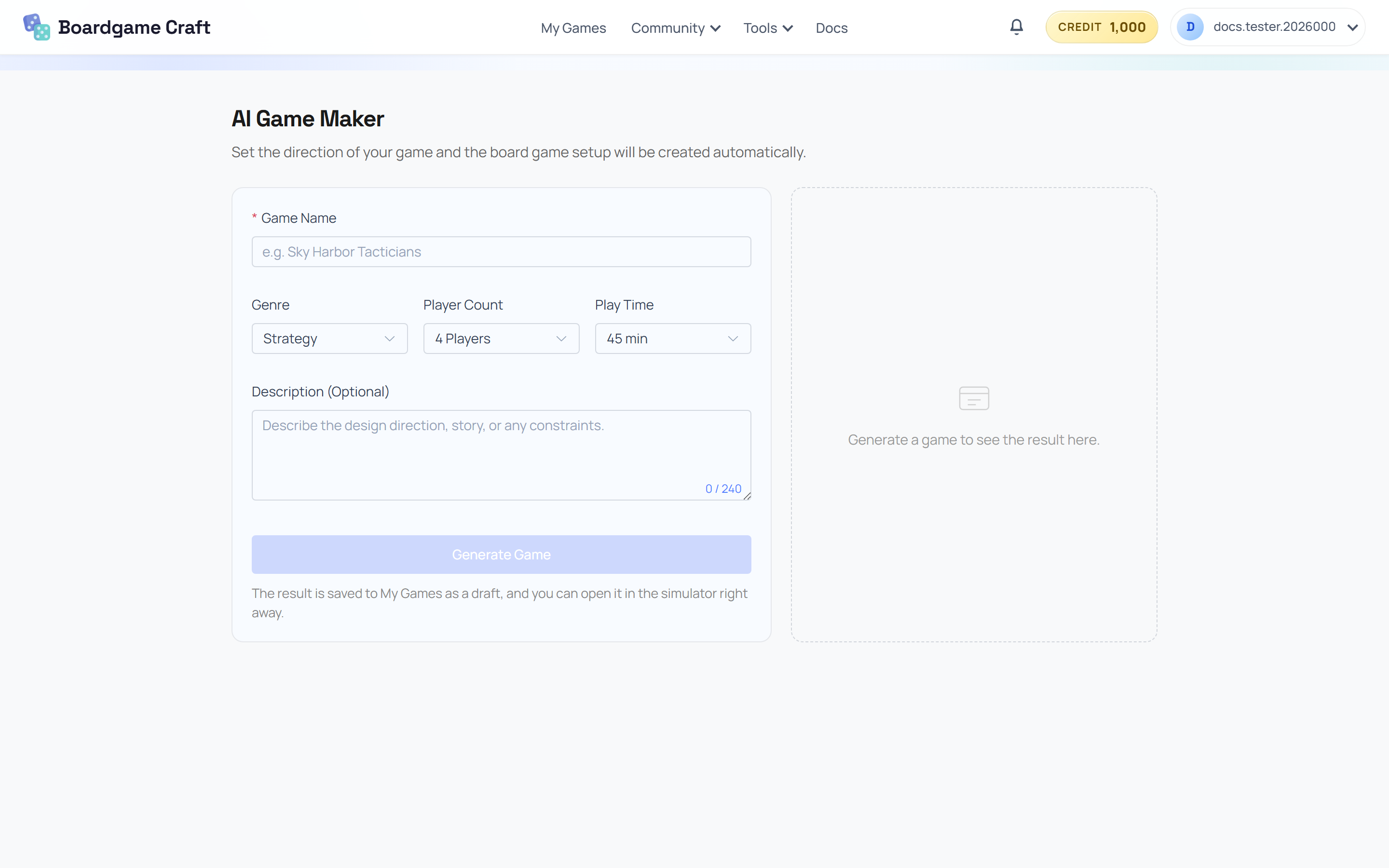
- Open AI Game Maker (you'll find it from My Games or at
/ai-game-maker). - Fill in the form:
- Game Name — e.g. Sky Harbor Tacticians.
- Genre — Strategy, Family, Cooperative, Party, Adventure, and more.
- Player Count — 1 to 6 players.
- Play Time — 15 to 120 minutes.
- Description (Optional) — the design direction, story, or any constraints you care about.
- Click Generate Game and wait a moment.
What you get
The result panel shows the generated design:
- A summary, objective, and theme
- A component list and deck cards
- The winning condition and turn structure
From there you can jump straight in:
- Open In Simulator — the generated table setup loads into the 3D simulator.
- Open Rulebook PDF — a generated rulebook you can read or share.
- My Games — the draft is saved there automatically, like any other game.
The generated game is a draft, not a finished product. Treat it as raw material: keep what works, replace what doesn't, and make it yours.